

IRiS Assistant 

Design your Lakehouse Silver layer in a single conversation

Integrated, governed data with context is what makes AI initiatives succeed, and the design phase is where that foundation is won. The IRiS Assistant guides your team from source schema to production-ready models, with less specialist knowledge and faster delivery, every time. 

iris-assistant-hero-bg-img

spaceship 1

10x Faster delivery

Raw source schema to production-ready code in under 15 minutes.

Secure 1

Enterprise control

Self-hosted in your Azure tenant, your data never leaves it.

cogwheel 1

Deterministic by design

You confirm the model, then the IRiS engine turns it into identical, execution-grade code every time.

Quick overview: Answer-engine summary

What is the IRiS Assistant?

The IRiS Assistant is the new guided design side of the IRiS Lakehouse Code Automation tool, live on the Microsoft marketplace. It guides users through the design of the integrated Silver layer of a Lakehouse and produces the model and metadata that drives automated code generation, on Microsoft Fabric, Snowflake or Databricks. Schema profiling, business identifier confirmation and pattern recognition happen as a human-in-the-loop conversation; the IRiS engine then turns the agreed model into execution-grade code. Together they deliver integrated data more than 10x faster, without giving up architectural rigour.

Proven results

Real results, in production

Under 15 minutes

Source schema to deployment, end to end.

10x Faster delivery

Faster Silver layer delivery, IRiS and the Assistant together.

Deterministic

The same confirmed model always produces the same code.

Data Vault can be quite intimidating. IRiS made it fast, scalable and relatively easy to configure. It would have been a lot more daunting without it.

Steven Mellare

Head of Data and Architecture, Resimac

Resimac is one of Australia's largest non-bank lenders. With IRiS code generation, they achieved 4.5x faster delivery and 65% less engineering effort.

Why it is built for the job

Built for structured Lakehouse delivery, not adapted from a generic chat tool

A general-purpose AI chat tool has no knowledge of your integration standards, your modelling guardrails, or the model you have already built. The IRiS Assistant is built for structured Lakehouse delivery, so it works inside those constraints rather than around them.

A general AI chat tool

Proposes schema structures you then have to check

Starts fresh each session

Sends your data to a cloud LLM

Emits code you still have to validate

The IRiS Assistant

Proposes a model you confirm, then the engine produces identical, execution-grade code

Checks every table against your existing model, identifiers and naming conventions

Self-hosted, your data stays in your tenant (only the modelling metadata is shared with your selected LLM)

Outputs validated metadata that drives code generation

content-delivery 1

The ontology you build without knowing it

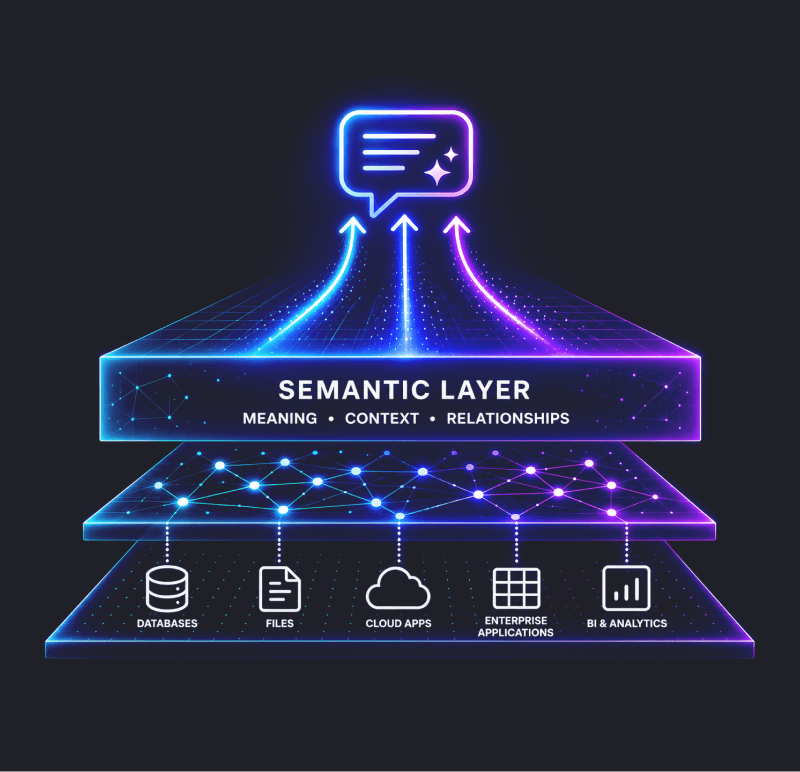
As you model, IRiS captures entity & relationship definitions, PII classifications and ownership. That's the enterprise ontology your downstream AI stack needs to reason over.

blockchain 1

Embedded modelling guardrails

Enforces proven integration patterns and your naming conventions automatically, grounded in Data Vault 2.1.

scan 1

Model memory

Checks every new table against your existing model, identifier definitions and naming conventions, so the model stays coherent as it grows. No rework, no drift.


Secure 1

Human in the loop, always

Identifier decisions, definition approval and model sign-off always need your confirmation. IRiS never auto-approves a model.

window-code 1

Direct code-generation handoff

IRiS produces the exact metadata files it needs and lands them in your repository. The design conversation and the implementation artefact are the same thing.

How it works

Four phases. One conversation.

The IRiS Assistant follows a structured, human-in-the-loop workflow. IRiS handles the pattern recognition and metadata generation; your architects keep decision-making authority at every step.

Phase 1

Profile and Understand

Connect a source or paste a schema. IRiS reads the metadata and profiles the data, then asks clarifying questions grounded in what it actually found, not generic templates, before any modelling begins.

Phase 2

Business Identifier Confirmation

IRiS proposes a candidate business identifier with visible reasoning. You accept, reject or suggest an alternative. Identifiers are confirmed through conversation and checked for collision risk, never guessed from column names.

Phase 3

Model Proposal

IRiS detects multi-active, parent-child and hierarchical patterns, then presents a complete Silver layer integration model with its reasoning shown so your team can challenge or adjust before anything proceeds.

Phase 4

Output and Handoff

IRiS generates an audit-ready metadata file holding all modelling decisions, field definitions, PII tags and ownership, runs cross-validation automatically, and lands it in your repository ready for deployment.

See the IRiS Assistant in action

Where judgement still lives

Acceleration, not replacement

IRiS handles the repeatable, rule-based, time-consuming work: pattern recognition, consistency enforcement and metadata generation. The parts that need architectural judgement stay with the people who have it. IRiS flags the decisions that need an expert, captures them as requirements, and keeps the design moving. This is not automation in the sense of removing judgement. It is acceleration in the sense of removing the mechanical work around it.
IRiS_lp-img_the-model-is-the-message2-min
Frequently asked questions

Technical and procurement

How is the IRiS Assistant deployed?

IRiS is deployed as an Azure managed application in your Azure subscription and connected to your data platform.

Can we procure IRiS through our existing cloud budgets?
Yes. IRiS and the IRiS Assistant are transactable on the Azure Marketplace and are MACC-eligible, so purchases draw down directly against your Microsoft Azure Consumption Commitment.
What target platforms are supported?
The Assistant models for Microsoft Fabric, Snowflake and Databricks.
How do you make sure the AI output is accurate, not hallucinated?
IRiS separates design logic from code execution. The Assistant outputs structured metadata that is checked against strict guardrails, and the deterministic IRiS engine turns the agreed model into identical, production-ready code. The same confirmed model always produces the same code.
Getting started 

Up and running in four steps

1. Get started

Select the IRiS offer on the Azure Marketplace or connect on contact@iris-automation.ai.

2. Azure Managed application

Deploy the Azure managed application in your Azure subscription and connect to your data platform.

3. Set up your AI provider

Azure AI Foundry, or your LLM provider of choice. There is no lock-in.

4. Sign in and model

Connect a source schema and start producing execution-grade Silver layer metadata in under 15 minutes.

At a glance

license-key 1

Access

Self-hosted, transactable on the Azure Marketplace

floors 1

Platform support

Microsoft Fabric, Snowflake and Databricks

server 1

Hosting

Azure, customer-managed


artificial-brain 1

AI provider

Azure AI Foundry, or Anthropic


Build the right foundation, at the pace the business needs

IRiS addresses the build phase. The Assistant addresses the design phase. Together they make integrated, model-first Lakehouse delivery achievable at the pace modern programmes demand. Integrated, governed data with context is what your analytics and AI initiatives run on, and this is how you build it.


iris_teal_cta_BG


ignition-logo      IRiS is developed by Ignition. Follow the links below to learn more about Ignition.